
Govalo is not working
If your gift card product doesn't offer a way for adding the recipient's details, and/or you see the regular "Add to Cart" rather than the "Send a gift card" button, you must confirm that the app extension is enabled in your theme:
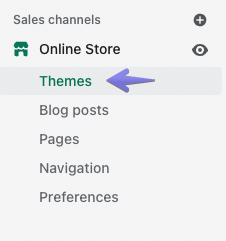
- On Shopify, navigate to Online Store >Themes:
- Click Customize on your published theme:

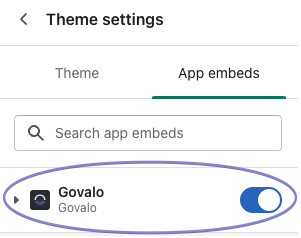
- Navigate into Theme settings > App embeds.
- Enable Govalo and Save it:
<aside><p><strong>Note:</strong> when switching to a new theme, you may need to re-enable the app extension in the new theme.</p></aside>
Updated on: 29/06/2026
Thank you!